
BlueStacks + Charles Proxy (Android 7 Nougat)
Настройка BlueStacks + Charles Proxy для просмотра HTTP/HTTPS трафика
-----
Использованы материалы:
https://evilsaloon.com/bluestacks-and-charles-proxy/
Только для BlueStacks 5.0 .. 5.14 и Android 7
1. Charles Proxy
-
На официальном сайте скачайте Charles: www.charlesproxy.com/
-
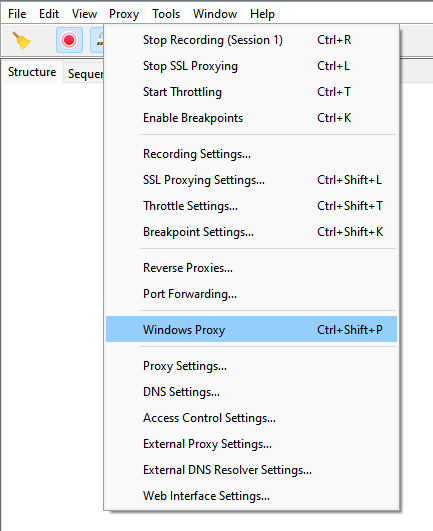
Убедитесь что у вас отключено Proxy -> Windows proxy
-
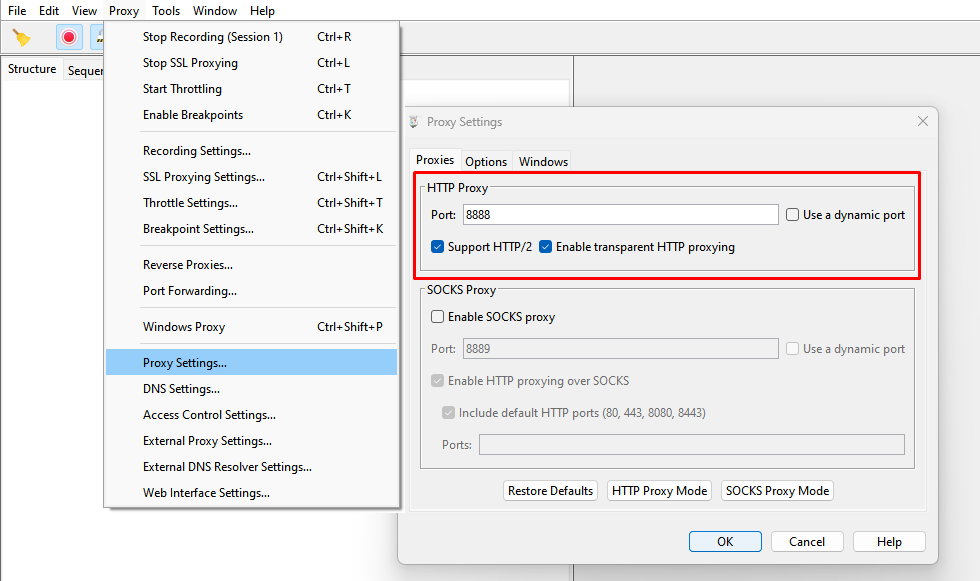
Proxy -> Proxy Settings - Нажмите на оба переключателя под "HTTP proxy"
-
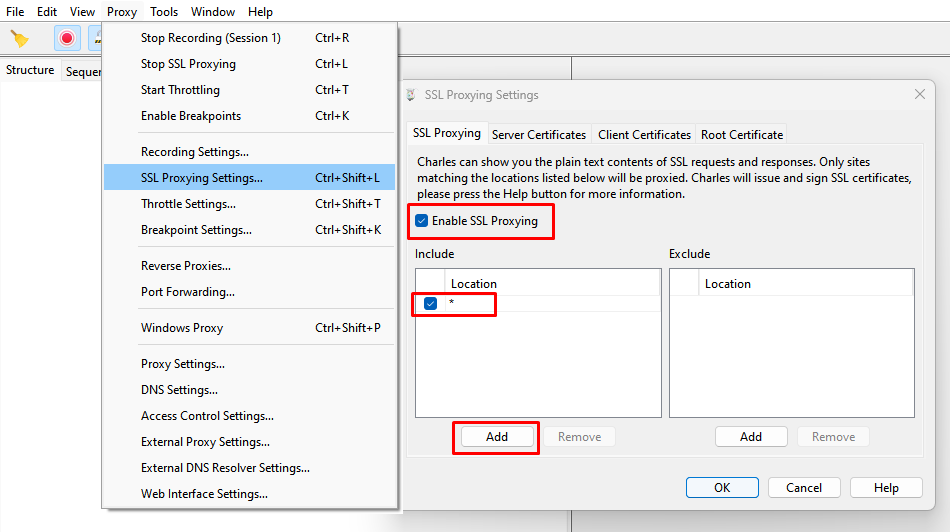
Включите SSL proxy: Proxy -> SSL Proxying Settings , включите "Enable SSL Proxying" и добавьте "*" в качестве Location
-
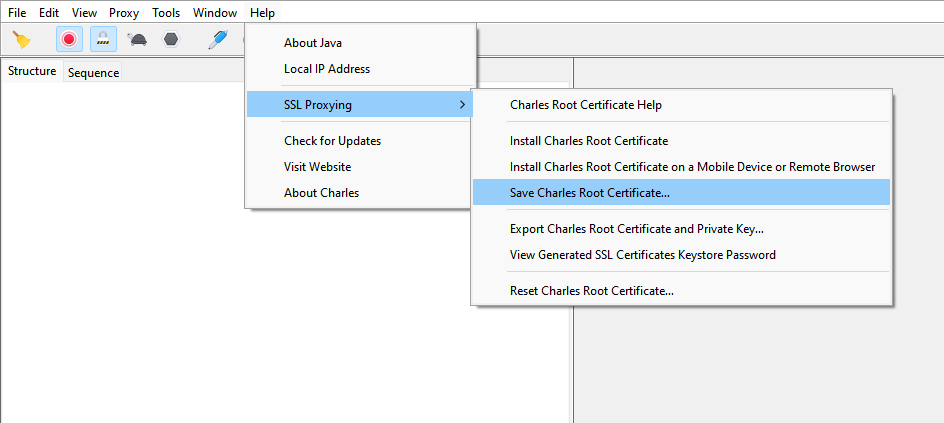
Сохраните корневой сертификат Charles Proxy: Help -> SSL Proxying -> Save Charles Root Certificate...
-
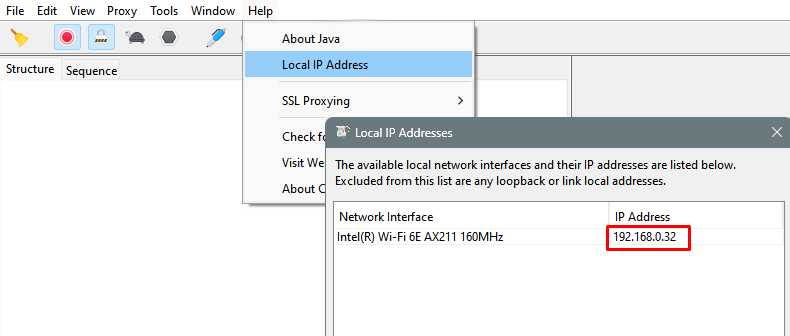
Посмотрите и запомните ваш локальный IP-адрес: Help -> Local IP Address
2. OpenSSL
- Скачайте и распакуйте портативную версию OpenSSL_win32:
https://sourceforge.net/projects/openssl-for-windows/
или отсюда: OpenSSL-1.1.1h_win32.zip
- Скопируйте в эту папку ранее сохранённый корневой сертификат Charles
- Запустите командную строку Windows, перейдите в каталог с OpenSSL и выполните команду:
На экране появится много текста:openssl x509 -inform PEM -subject_hash_old -in charles_root.pem

Скопируйте первую строку, добавьте к ней в конце ".0" и вставьте в следующую команду:
openssl x509 -inform PEM -text -in charles_root.pem > 9898d94e.0
3. BlueStacks + Tweaker
- Установите BlueStacks , не старше версии 5.14
https://cdn3.bluestacks.com/downloads/windows/nxt/5.14.21.1004/26a5440b147b9f4dd572002e7cb38f05/FullInstaller/x64/BlueStacksFullInstaller_5.14.21.1004_amd64_native.exe
https://cdn3.bluestacks.com/downloads/windows/nxt/5.14.21.1004/26a5440b147b9f4dd572002e7cb38f05/FullInstaller/x86/BlueStacksFullInstaller_5.14.21.1004_x86_native.exe
https://cdn3.bluestacks.com/downloads/windows/nxt/5.14.21.1004/26a5440b147b9f4dd572002e7cb38f05/BlueStacksMicroInstaller_5.14.21.1004_native.exe
- Скачайте BlueStacks Tweaker 6:
https://bstweaker.ru/zip/BSTweaker/BSTweaker69020.zip
или отсюда: BSTweaker69020.zip
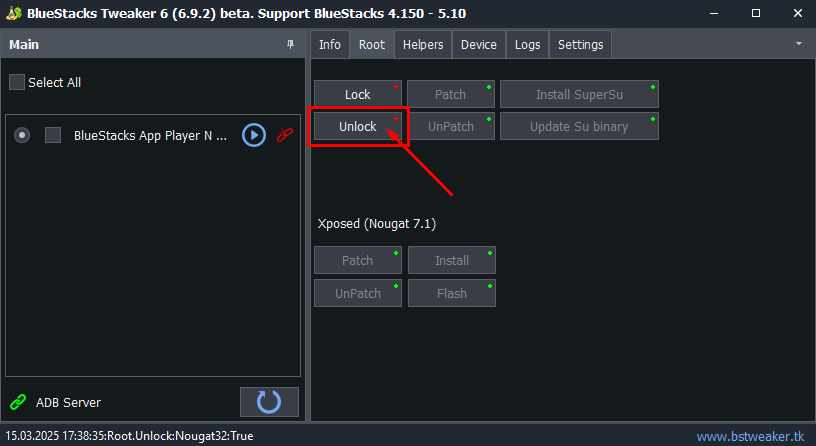
- Запустите BlueStacks Tweaker и перейдите на вкладку "Root".
Убедитесь, что эмулятор BlueStacks закрыт и нажмите «Unlock». Это разблокирует BlueStacks для установки root.
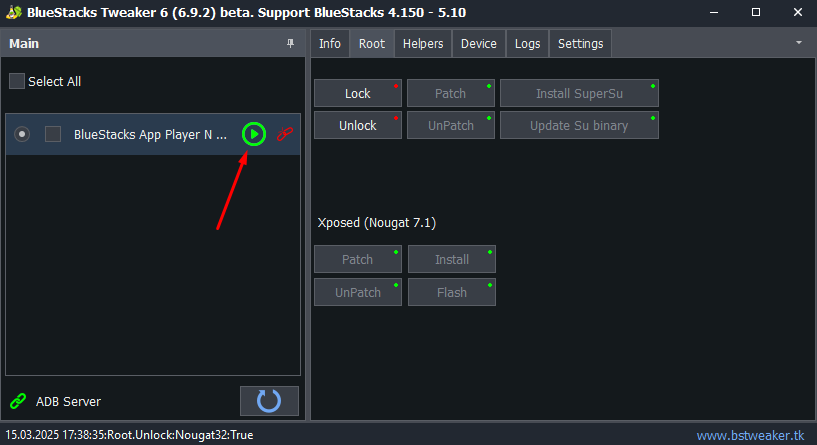
- Как только это будет сделано, нажмите кнопку «Воспроизведение» рядом с вашим андроид и дождитесь загрузки. Убедитесь, что у вас именно Android Nougat (7.1), потому что твикер BlueStacks не поддерживает Android более свежих версий!
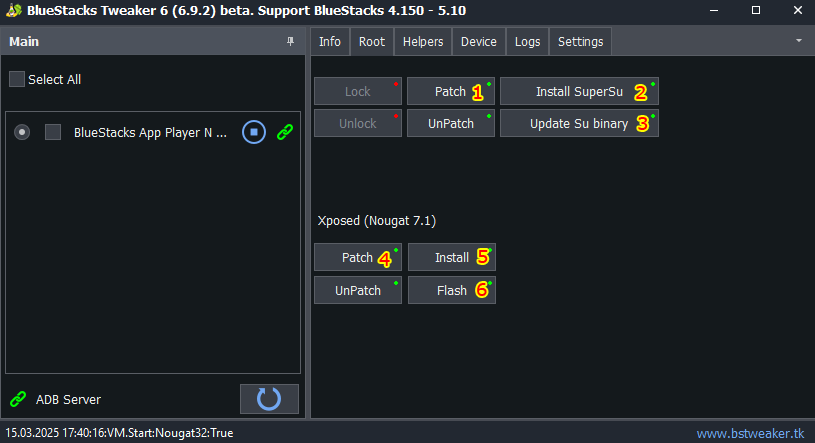
- После того, как BlueStacks загрузится, нажмите «Patch», затем «Install Supersu», затем «Update Su binary». Это закроет BlueStacks, так что не удивляйтесь.
Запустите его снова, и под Хposed нажмите «Patch», «Install», а затем «Flash».
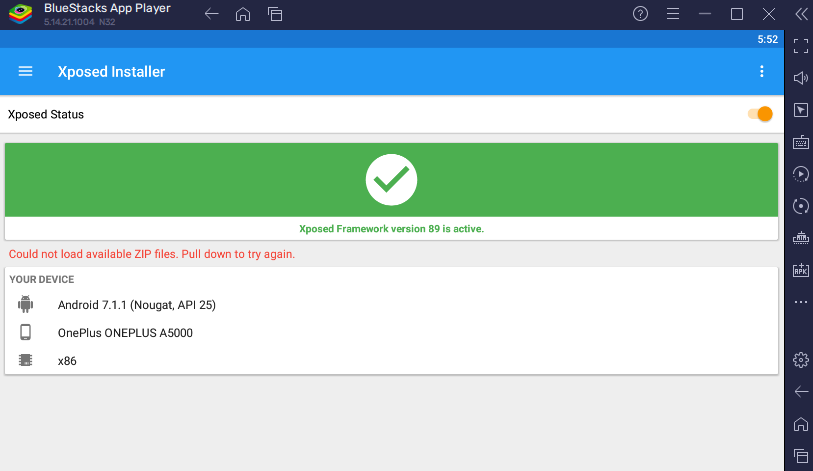
- Перезагрузите BlueStacks, а затем откройте Xposed.Он должен сказать, что «Xposed Framework version 89 is active».и отобразить зеленую галочку. Это означает, что мы можем перейти на следующий шаг
- Загрузите и установите Хposed модуль TrustMeAlready :
https://github.com/ViRb3/TrustMeAlready/releases
или отсюда: TrustMeAlready-v1.11-release.apk
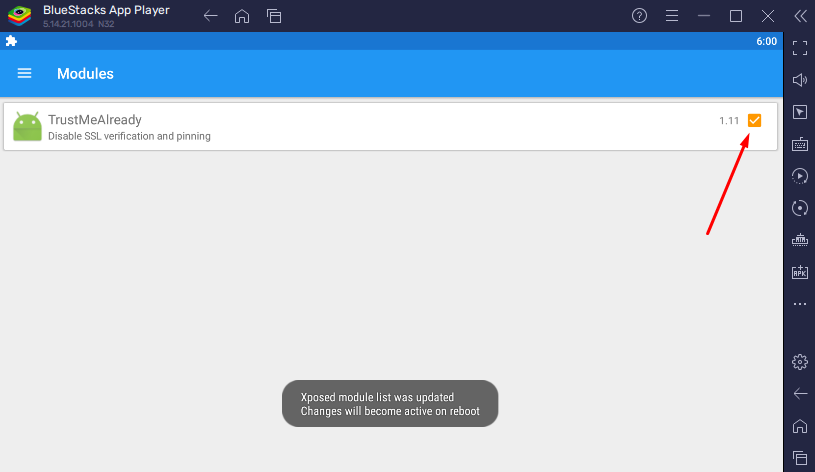
- Перейдите в Xposed Installer -> Modules и включите его.
Это отключает проверку SSL и закрепление для большинства приложений, заставляя их доверять корневым SSL - сертификату Charles, позволяя нам просматривать трафик
4. Заключительные шаги
Теперь, когда все подготовительные этапы пройдены, осталось всего несколько шагов.- Вам понадобится приложение, например X-Plore , для редактирования системных файлов Android, чтобы добавить наш прокси и сертификат Charles.
Установите отсюда: https://play.google.com/store/apps/details?id=com.lonelycatgames.Xplore
или скачайте отсюда: X-plore_v4.31.08.apk
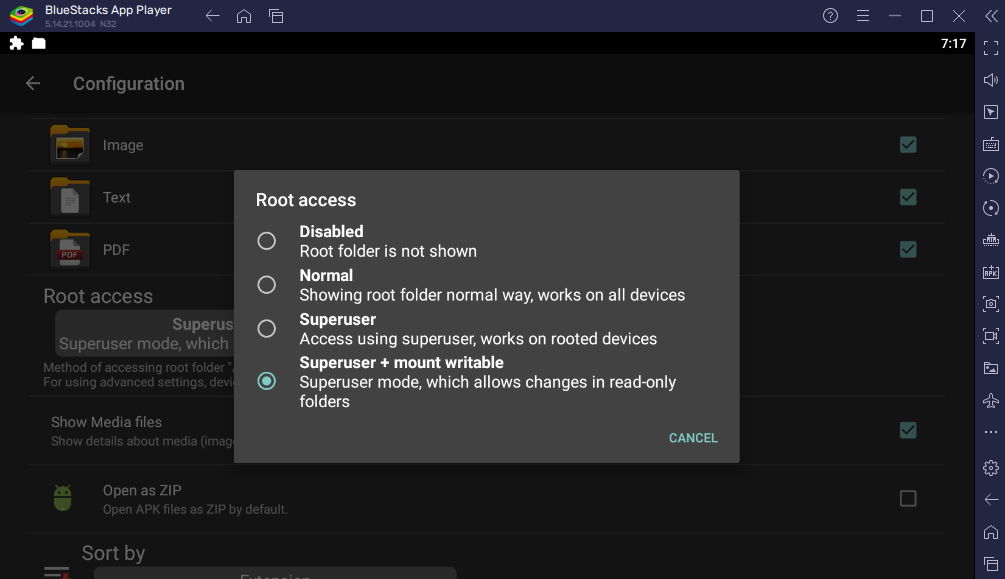
- После того, как вы загрузили и установили приложение, нажмите три точки в правом верхнем углу и нажмите «Configuration». Вам нужно будет установить приложение в режим «Superuser + mount writable»
-
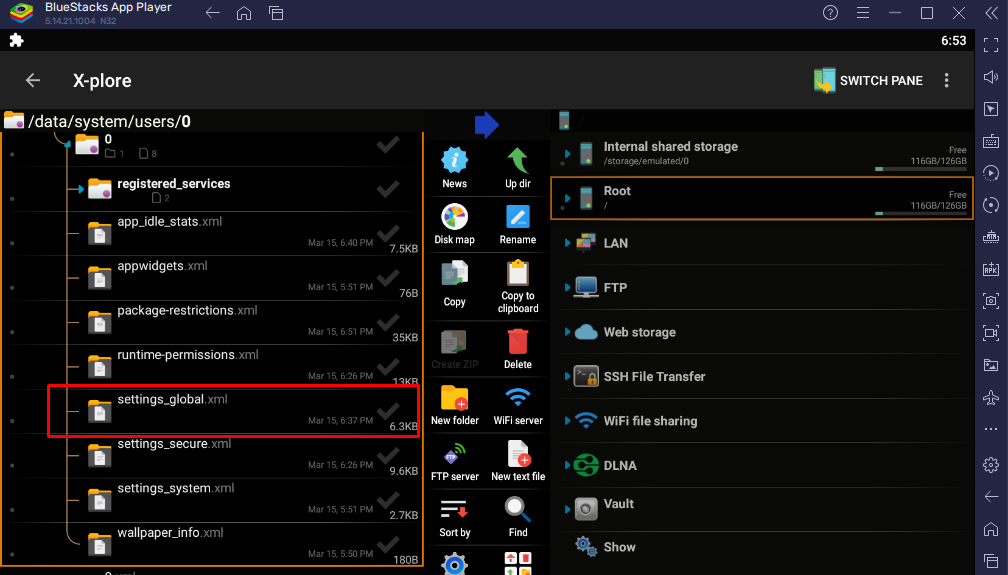
Перейдите в каталог /data/system/users/0 (это попросит права суперпользователя, нажмите "Grant") и откройте в текстовом редакторе "settings_global.xml".
- Теперь добавьте эти строки, и не забудьте прописать ваш IP-адрес, который вы получили в пункте 1.Charles.6 :
<setting id="100" name="global_proxy_pac_url" value="" package="android" /><setting id="97" name="global_http_proxy_host" value="192.168.0.32" package="android" /><setting id="98" name="global_http_proxy_port" value="8888" package="android" /><setting id="99" name="global_http_proxy_exclusion_list" value="" package="android" /><setting id="96" name="http_proxy" value="192.168.0.32:8888" package="com.android.shell" />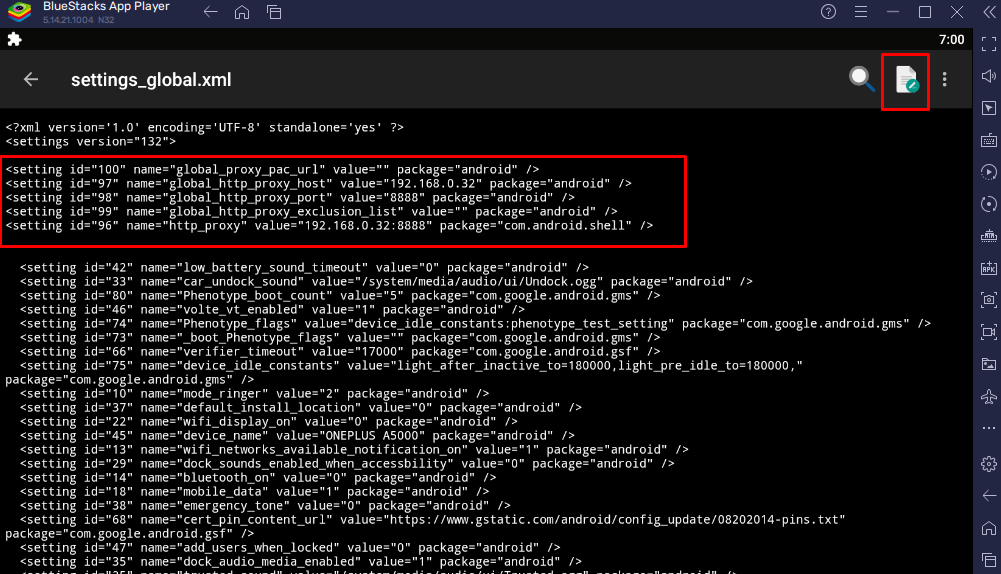
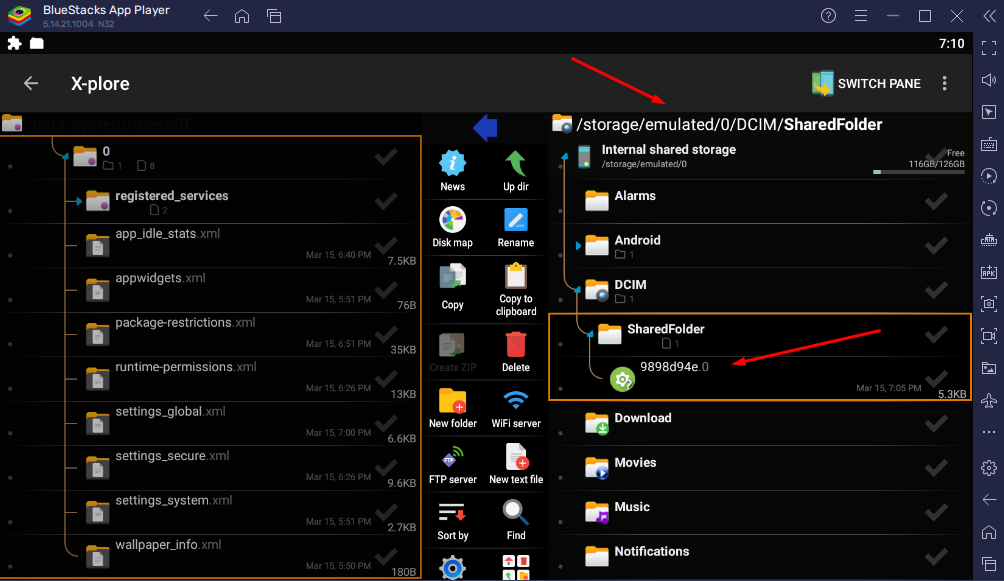
- Перетащите в BlueStacks ранее сохранённый файл 9898d94e.0 из пункта 2.OpenSSL.
Вы его найдёте здесь: /storage/emulated/0/DCIM/SharedFolderНапоминаю! 9898d94e - это мой файл! У вас будет другое имя этого файла!
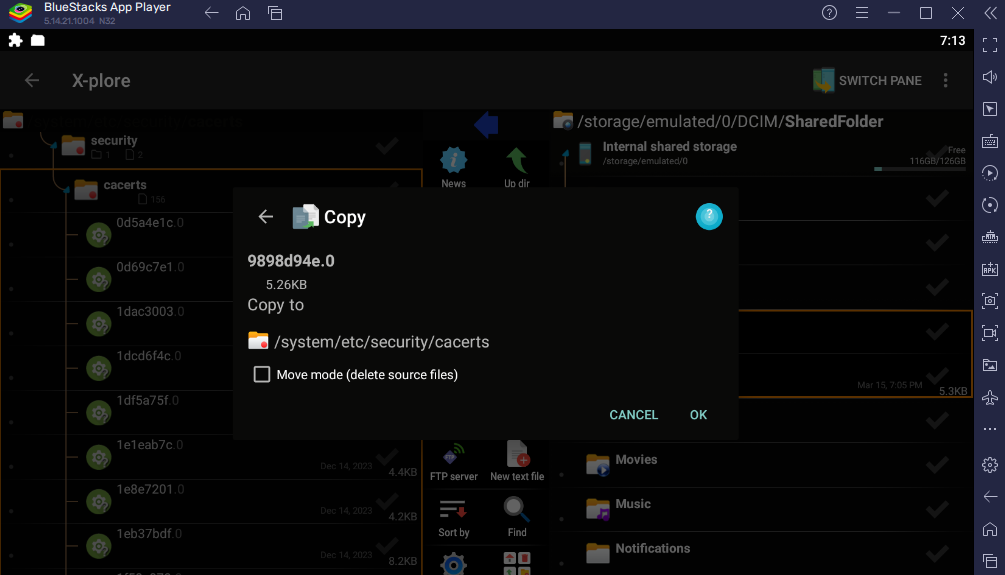
- Скопируйте этот файл в директорию /system/etc/security/cacerts
- Перезагрузитесь и наслаждайтесь! :)
-----
Использованы материалы:
https://evilsaloon.com/bluestacks-and-charles-proxy/
Похожие материалы:
31 Августа 2026 (04:56:33)
James Miller
(гость)
• ответить
I like that the article calls out the exact BlueStacks version limit, 5.14 or older, and the Android Nougat requirement. That detail makes the proxy setup much clearer. sms bus
11 Сентября 2026 (08:19:46)
meoowu77
(гость)
• ответить
Profiling Canadian venues, I realised that a club can look polished at first glance, but the true value becomes clear only when you examine the details closely. Game variety, clarity of deposit methods, support responsiveness, and the overall atmosphere often determine whether the experience feels genuinely satisfying. I usually rely on comments that describe real visits rather than promotional slogans. During my search, Casino Delta appeared in several discussions where players talked about places worth considering, and those firsthand impressions painted a clearer picture than any marketing material.
11 Сентября 2026 (08:24:47)
ken650026
(гость)
• ответить
Profiling Canadian venues, I realised that a club can look polished at first glance, but the true value becomes clear only when you examine the details closely. Game variety, clarity of deposit methods, support responsiveness, and the overall atmosphere often determine whether the experience feels genuinely satisfying. I usually rely on comments that describe real visits rather than promotional slogans. During my search, Casino Delta appeared in several discussions where players talked about places worth considering, and those firsthand impressions painted a clearer picture than any marketing material.
26 Сентября 2026 (23:09:12)
richerson
(гость)
• ответить
This blog post is a valuable resource for anyone interested in [topic]. I appreciate the effort you put into compiling this information. plab exam
28 Сентября 2026 (23:01:14)
nesteroid
• ответить
Hey folks! Hope everyone's having a decent week. Wanted to share something because I've been genuinely impressed. A coworker mentioned this place during lunch—she'd had a decent win and wouldn't stop grinning. I'm normally skeptical of workplace casino recommendations, but she showed me her withdrawal confirmation. The interface was the first thing I noticed—clean, no annoying pop-ups, games loaded instantly on my ancient phone. Put in fifty bucks, played poker variants I'd never tried. Within an hour I was up 180. I've stuck with crown casino southbank because wagering requirements are actually reasonable, not one of those 50x bonus traps. Made about 2,000 over two months in AU.
9 Октября 2026 (01:45:29)
Napoleon
(гость)
• ответить
I really like your blog and the topics you cover. Please keep posting! I’ve been using HiAnime recently whenever I’m looking for a new anime series to watch. [url=https://hianimes.day]]hianimes.day[/url
9 Октября 2026 (01:47:20)
Napoleon
(гость)
• ответить
I really like your blog and the topics you cover. Please keep posting! I’ve been using HiAnime recently whenever I’m looking for a new anime series to watch. hianimes.day
9 Сентября 2026 (10:56:03)
Ramona J. Fisher
(гость)
• ответить
This is a useful, focused guide for anyone trying to inspect app traffic in BlueStacks, especially since proxy setup can vary so much between Android versions. I like that it clearly separates the instructions for Nougat, Pie, and newer releases. Infinite Craft would be much easier to troubleshoot with this kind of version-specific setup information.
16 Сентября 2026 (14:49:44)
ramsaybolt
(гость)
• ответить
Spent two annoying hours balancing fan blades on my bedroom ceiling fan to stop ticking noise. Needed a chill pastime, so I opened crown online casino on laptop. Users residing in Australia can grab sweet deposit boost credits, extra free spin packages, and daily surprise prize wheel turns. Navigation felt completely natural, setup took under two minutes, and it provided a super comforting, stress-free break resting on my living room sofa.
29 Сентября 2026 (21:42:39)
Noclipio
(гость)
• ответить
Most local lounges around central Vancouver Island only have a handful of outdated gaming machines that get boring fast. I wanted a venue with hundreds of modern slots and proper table limits, which led me to casino nanaimo earlier this month. The selection of progressive jackpot slots is easily the best in the Nanaimo area. I dropped in after work on Thursday, played a few rounds of video poker, and ended up hitting a sweet bonus round. The local Canadian staff were super welcoming and helpful from start to finish.